Guide · 6 min read · Nov 11, 2026
Motion Graphics Video Maker for Shorts, Reels & TikToks
AI Short Videos now makes Motion Graphics videos with animated cartoon characters, places and text—more videos per credit for YouTube Shorts, Reels and TikTok.
What Is the Motion Graphics Video Maker?
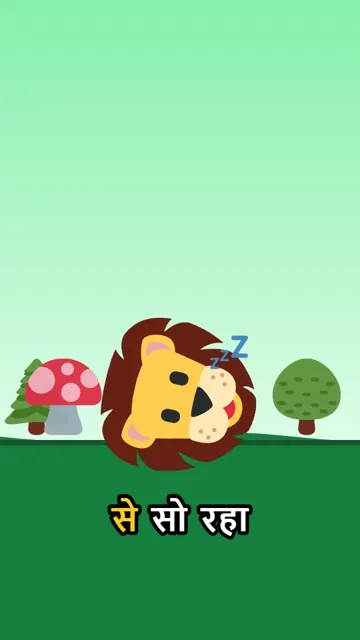
AI Short Videos has launched Motion Graphics, a new style that creates animated faceless videos for YouTube Shorts, Instagram Reels, TikToks and Facebook. Instead of using AI-generated pictures with camera motion, Motion Graphics videos use animated scenes: cartoon animals and people that walk, fly, talk in speech bubbles, think and celebrate; places like forests, deserts, cities, space and temples; plus counting numbers, top lists, comparison cards, quotes and call-to-action endings.
The AI still writes the script and records natural voiceovers in 28 languages, but the visuals are animated graphics instead of static images with zoom or pan. This makes Motion Graphics the most affordable video style on the platform—it costs just 2 credits per 30 seconds, compared to 7 credits for AI picture videos of the same length.
What Does a Motion Graphics Video Look Like?
Motion Graphics videos include 8 types of animated scenes that bring your script to life:
- Cartoon animals: Characters that walk, fly, swim or move through the scene
- Cartoon people: Human characters in motion—walking, talking, celebrating or thinking
- Places and backgrounds: Forests, deserts, seas, cities, space, homes, schools, temples and more
- Speech bubbles and thought clouds: Characters talking or thinking with text in bubbles
- Counting numbers: Animated numbers for educational or list content
- Top lists: Visual list cards with rankings or comparisons
- A-vs-B comparisons: Side-by-side comparison graphics
- Quote cards and call-to-action endings: Text-based scenes with motion for quotes or channel prompts
Every scene is animated instead of a still image, so viewers see movement throughout the video—perfect for holding attention on short-form platforms. You can see 10 sample Motion Graphics videos to understand the style.
Who Should Use Motion Graphics?
Motion Graphics work best for specific types of content where animated visuals tell the story better than realistic images:
Moral Stories and Kids Stories
Cartoon animals and people are ideal for storytelling with a lesson. A lion walking through the forest, a child learning at school, or birds flying in the sky—these animated scenes make stories come alive for young audiences and family-friendly channels.
Facts, Lists and Educational Content
If you create facts and list videos, Motion Graphics gives you counting numbers, top-list cards and comparison visuals. "Top 5 ways to save money" or "Ocean vs. desert animals" work perfectly with these animated elements.
Motivation and Quotes
For motivational content and quote videos, Motion Graphics offers thinking characters, celebration animations and quote cards that make your message stand out without needing a face or realistic scenes.
Money Tips and Business Advice
Animated graphics work well for explainer content—showing concepts with cartoon characters and comparison cards keeps the focus on the information, not on realistic visuals.
When NOT to Use Motion Graphics
Motion Graphics is not designed for cinematic or realistic character-driven stories. If you're making horror videos, mythology with epic visuals, or Reddit stories that need realistic settings, use AI pictures with camera motion instead. That style creates a new AI-generated image for each scene with zoom, pan or shake effects—better for dramatic or realistic content.
How to Make a Motion Graphics Video
Creating a Motion Graphics video on AI Short Videos takes just a few steps:
- 1Pick a templateGo to the dashboard and choose a Motion Graphics template like Cartoon Stories, Facts & Lists, or Motivation & Quotes. Each template is pre-set with the Motion Graphics style.
- 1Or choose Motion Graphics manuallyIf you start with any niche or write your own script, you'll reach the "Motion" step where you can select Motion Graphics as the video style.
- 1Set your language and voiceAI Short Videos supports 28 languages written in their own script, including Hindi, Punjabi, Marathi, Gujarati, Bengali, Tamil, Telugu, Kannada, Malayalam, Urdu, Haryanvi, Bhojpuri, English, Spanish and Arabic. Pick a voice for your narration.
- 1Generate the videoThe AI writes a script (or uses your pasted story word for word), records the voiceover, creates animated Motion Graphics scenes, adds word-by-word captions and background music.
- 1Edit if neededAfter the video is made, you can edit lines, redo the voice or regenerate a scene.
- 1Publish or downloadPost in one click to YouTube Shorts, TikTok, Instagram Reels or Facebook Pages, or download the MP4 file on paid plans.
You can also set up a Series on a schedule: choose your niche, Motion Graphics style, voice and posting days once, and new episodes are made automatically and wait for your review in Videos & Calendar. Nothing is posted without you.
Why Motion Graphics Gives You the Most Videos Per Plan
Because Motion Graphics costs only 2 credits per 30 seconds—compared to 7 credits for AI picture videos—you get more videos per plan period. Here's how many 30-second videos you can make with each style:
| Plan | Price (India) | Motion Graphics (30s) | AI Pictures (30s) |
|---|---|---|---|
| Free | Free | A few credits to try | A few credits to try |
| Weekly | ₹549 ($7) | 35 videos | 10 videos |
| Starter | ₹1,499/month ($15) | 100 videos | 28 videos |
| Daily | ₹2,999/month ($31) | 250 videos | 71 videos |
| Pro | ₹5,999/month ($62) | 550 videos | 157 videos |
If you're posting daily or running multiple channels, Motion Graphics lets you create 3 to 4 times more videos with the same plan compared to AI picture videos.
Bundles of 3, 6 or 12 months cost less per month, and you can pay in rupees with UPI, cards or net banking. There's a 7-day refund on the first payment.
When Should You Use AI Pictures Instead?
Motion Graphics is the most affordable and best for animated, explainer-style content. But if your videos need:
- Cinematic or realistic visuals: Horror, mythology, dramatic Reddit stories
- Detailed character faces or settings: AI-generated images give you more realistic scenes
- Epic or atmospheric moods: AI pictures with zoom and pan create a different feel
...then choose AI pictures + camera motion (7 credits per 30 seconds, 12 credits per minute). You can also add a 5-second real AI video hook or use Full Motion where every scene is an AI video clip for the most cinematic result (uses the most credits).
Every plan includes all three video styles—you decide which to use for each video based on your content.
Start Making Motion Graphics Videos Today
Motion Graphics is now available on all AI Short Videos plans. Whether you're creating cartoon stories, facts, motivation, or educational content in Hindi or any of 28 languages, this motion graphics video maker helps you produce more videos, faster, and at the lowest cost per video.
See the Motion Graphics style in action: View 10 sample videos and start creating, or compare plans and pricing to find the right fit for your channel.